Engineering
RAG assistant for Myntra's Appliqué

The problem
At Myntra, we use an internal design system called Appliqué. It has hundreds of components — accordions, banners, buttons, dropdowns, date pickers, and more. The documentation lives on a website, and every time you want to know how a component works, you leave the IDE, search the docs, skim through props, then come back.
That's a lot of context-switching for something that should be instant. I wanted to fix that.
The idea
What if you could ask "How do I use the Layout component?" right inside your editor and get a useful, contextual answer back — with code examples?
That's exactly what this project does. It's a RAG (Retrieval-Augmented Generation) system built specifically for the Appliqué documentation, exposed as an MCP server so Cursor IDE can call it directly.
How it works
There are four moving pieces.
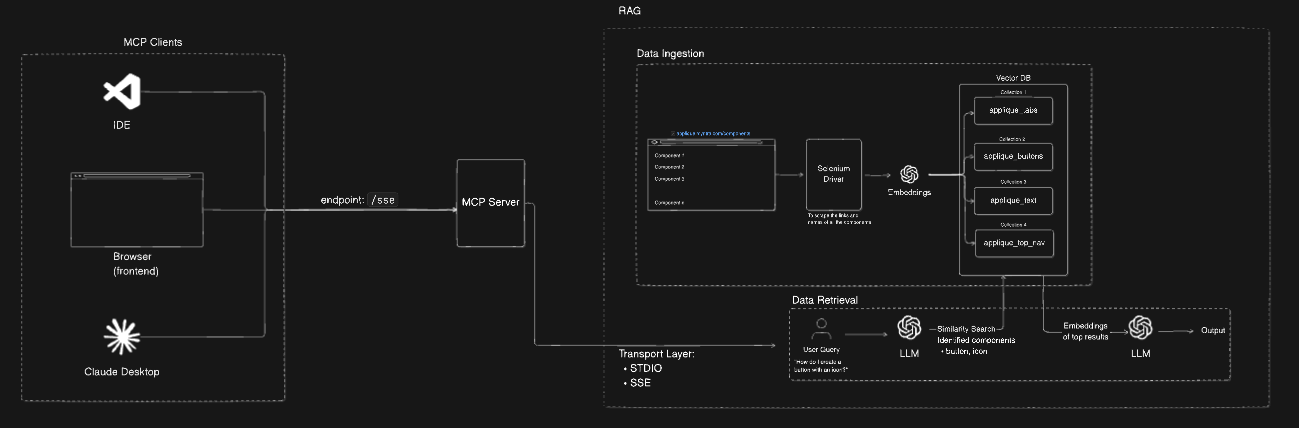
1. Scraping the docs
The Appliqué site is JavaScript-rendered, so a plain HTTP fetch won't cut it. I used Selenium with headless Chrome to fully load each page, then extracted the component descriptions, code examples, and API property tables.
Every component gets its own structured document with metadata — the URL, a timestamp, and flags for what type of content it contains (description, code, props).
2. Chunking and embedding
Raw documentation pages are long. Dumping an entire page into a vector DB as one chunk makes retrieval noisy — you get too much irrelevant content back.
I split each document into chunks of 1000 characters with 200-character overlap. The overlap matters: it means a relevant sentence at the boundary of a chunk doesn't get cut in half and lost. Each chunk is then embedded using OpenAI's embedding model and stored in Qdrant, with a separate collection per component.
One collection per component is a deliberate choice. It makes routing queries much more precise — instead of searching everything, you only search the collections relevant to the question.
3. Query routing and retrieval
When you ask a question, the system doesn't just embed it and search everything. It first routes the query.
A GPT-3.5 call analyzes the question and decides which component collections are relevant. Ask about "Layout with a progress bar" and it'll route to both applique_layout and applique_progress, search each, then aggregate the top results.
# Simplified routing logic
collections = route_query_to_collections(user_query)  # GPT-3.5 decides
results = []
for collection in collections:
    hits = qdrant.search(collection, embed(user_query), limit=2)
    results.extend(hits)
4. Generating the response
The retrieved chunks get assembled into a context block and sent to GPT-3.5 along with the original question. The prompt is structured to produce:
- A brief plain-English explanation
- Key features and variations
- A working code example
- Important props/API details
The output is consistently structured because the prompt forces it — not because the model guesses what format you want.
The MCP layer
This is the part that makes it actually useful day-to-day.
MCP (Model Context Protocol) lets tools expose themselves as servers that IDEs like Cursor can call. I wrapped the entire RAG pipeline in an MCP server with two transport options:
- STDIO — for direct Cursor integration. The IDE spawns the process, sends queries over stdin, gets responses over stdout.
- SSE — for future use cases where you want a persistent server and streaming responses.
{
  "mcpServers": {
    "applique-rag-stdio": {
      "command": "node",
      "args": ["/path/to/mcp/stdio/index.js"]
    }
  }
}
Once configured, you ask a question in Cursor and the answer comes back in-context, without leaving the editor. No tab-switching, no doc searching.
What I learned
Chunk size is everything. 512 tokens felt too small — answers lacked context. 1000 characters (roughly 700 tokens) hit the sweet spot for this kind of API documentation.
Per-collection routing beats global search. Searching across all 80+ component collections for every query is slow and noisy. Routing first, searching second keeps results tight.
The MCP integration is underrated. Having the RAG system callable from inside the IDE changes how you interact with documentation. It feels less like a search engine and more like a knowledgeable colleague sitting next to you.
What's next
- Add support for streaming responses over SSE so answers start appearing before the full generation completes
- Fine-tune the routing to handle ambiguous queries better (e.g. "input field" could mean
input-text,input-date, orinput-select) - Hook it into the frontend via the AI SDK's
experimental_createMCPClientfor a web-based chat interface
The code is on GitHub if you want to poke around or adapt it for your own design system.